
Cryptonite Browser Extension Protects You From Phishing Sites and Fake Profiles
If you are new to the crypto space or if you are exploring new services and platforms, protection from scams and malicious websites should be a priority. Cryptonite is a useful browser extension that protects your private information and warns you in advance about risks to your crypto security.
Also read:
Anti-Phishing Addon Available for Major Browsers and Brave
is an anti-phishing and anti-fraud software developed by Metacert, a company that offers internet security solutions for various platforms, devices and applications. The addon is available for major browsers such as Google Chrome, Mozilla Firefox, Opera, and Brave, which is gaining popularity in the crypto community.
Once installed in your browser, the extension informs you if a crypto site you are visiting is verified with a green shield in the upper right corner. A black shield means that the website is unknown and could either be a new phishing scam or a page that has not been verified yet. In this case, you should treat it with caution.
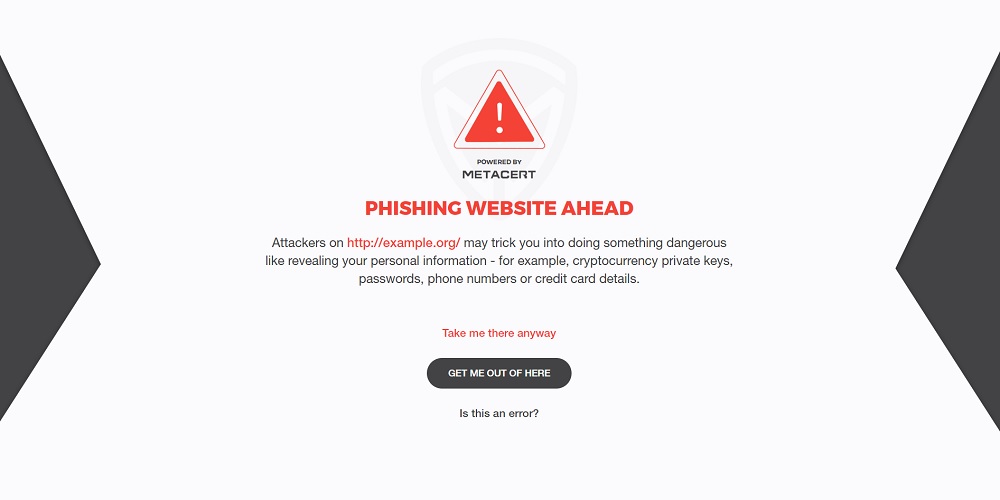
Cryptonite will also display a warning if you are about to open a known phishing website. These often mimic legitimate platforms such as digital asset exchanges. Hackers create them in order to get hold of your sensitive personal information including login details, financial data and private crypto keys.
Users are then given several options. They can either proceed to the website ignoring the warning or return to a previous page. Alternatively, they can submit a report if they believe the domain has been labeled as a malware/phishing site in error.
The Cryptonite extension is a paid service that comes with a 30-day free trial. Metacert offers two subscription plans for private individuals: Personal, which supports up to five browsers for $3.99 a month, and Family with a license key for up to 25 browsers for $9.99.
Both plans offer protection against phishing websites, fake crypto apps, Twitter and Reddit accounts, and warning against fake Linkedin profiles. Businesses ordering 20 or more licenses can get a discount.
What applications are you using to increase your browsing security? Tell us in the comments section below.
Disclaimer: Readers should do their own due diligence before taking any actions related to third party companies or any of their affiliates or services. is not responsible, directly or indirectly, for any damage or loss caused or alleged to be caused by or in connection with the use of or reliance on any third party content, goods or services mentioned in this article.
Images courtesy of Shutterstock.
At OhioBitcoin.com there’s a bunch of free helpful services. For instance, have you seen our page? You can even lookup the exchange rate for a transaction in the past. Or calculate the value of your current holdings. Or create a paper wallet. And much more.
Share this story:
Tags in this story
, , , , , , , , , , , ,
Lubomir Tassev
Lubomir Tassev is a journalist from tech-savvy Bulgaria, which sometimes finds itself at the forefront of advances it cannot easily afford. Quoting Hitchens, he says: ”Being a writer is what I am, rather than what I do.“ International politics and economics are two other sources of inspiration.
Dogecoin Price Continues Downtrend yet 50 Satoshi Level Holds True In the cryptocurrency world, very few projects are successful over the course of multiple years. While bitcoin, Ethereum, and XRP are clearly setting the bar […]
This is a re-write of “”. Please note: Everything in this article is just advice based on our best understanding of the current situation.
Gold
(also referred to as Bgold, and trading under the ticker BTG) November 12, 2017. Since the bitcoin blockchain technically forked on bitcoin block 491407, anyone who held bitcoin (BTC) on October 24, 2017 should have an equivalent amount of BTG attributed to their bitcoin private keys.
In our, we explained how to secure your private keys so you could be sure to access your BTG and B2X. The B2X fork has since been by the leaders of that project, however, and it currently seems very unlikely to happen in any serious way.
As such, this follow-up article explains how you can claim (and potentially use) your BTG — only your BTG.
Be Careful
Good news: bitcoin Gold enforces strong replay protection. This means you can’t accidentally spend your BTC when you mean to spend BTG or vice versa.
As such, if you don’t care about BTG at all right now, you don’t need to do a thing. You can just keep using bitcoin as you always have. If you ever change your mind (and don’t lose your bitcoin private keys in the meantime), you can still claim your BTG at any point in the future.
Likewise, if you want to hold onto your BTG long term, you also don’t need to do anything right now. You can keep using BTC as if nothing happened; just make sure to never lose your private keys.
(In both these cases, however, it could come in handy to keep a record of the bitcoin addresses that stored your bitcoins at the time of the split. This is not strictly necessary, but your future self may thank you if you do it. You should be able to find this information in your wallet of choice, though where you find it may differ a little bit from wallet to wallet. Alternatively, you could move all your coins to a new address. If you then look up all your transactions since October 25, 2017, and note which addresses spent coins since that date, you know which addresses held coins at the time of the split.)
Now let’s assume you do care about BTG right now, at least enough to want to sell your share. (1 BTG is trading around 0.02 BTC at the time of writing of this article, so you could earn a 2 percent “dividend” on your BTC if you decide to sell.)
If you followed the advice outlined in our beginner’s guide, the good news is that you should be in full control of your bitcoin private keys. This means you now hold BTC as well as BTG.
The bad news is that it’s not necessarily easy or safe to claim your BTG. If you’re using insecure (or even malicious) software, you may accidentally expose your private keys. And because these are the same private keys that secure your BTC, this exposure could lead to your BTC being stolen. You stand to lose much more from losing your BTC than you stand to gain from selling your BTG.
Therefore, you are going to want to take your time and make sure you understand what you are doing well enough to do it without exposing your private keys. Your BTG isn’t going anywhere.
Accessing Your Coins
In our beginner’s guide to surviving the Bgold (and SegWit2x) forks, we explained how to secure your private keys and recommended different wallet options. Here, you can find, per option, how to access your BTG.
Note that while it’s not strictly necessary in all cases, it’s probably best to first move your bitcoins (BTC) to a new address, or even a whole new wallet with a new seed, before you even touch your BTG. This way you don’t add any security risks, while it’s potentially also a bit better for privacy. (More on this below.)
Paper Wallet
The first recommendation in our beginner’s guide to surviving the Bgold (and SegWit2x) forks was to use a paper wallet. This advice was given in the context of storing your coins long term in particular. But if you want to access your BTG, you can, of course, do this right away.
However, the point of a paper wallet really is that your private keys are not stored in any device that could be hacked. Therefore, if you’re going to upload your private key into a bitcoin Gold wallet, you should definitely create a whole new paper wallet with a new private key for your bitcoin (BTC). It’s probably best to then first sweep your private keys with a bitcoin (BTC) wallet, and then send the coins to this new paper wallet for BTC.
and are two wallets that allow you to sweep bitcoin private keys. Look for the “sweep” option in the menus of these wallets; that’s where you can scan the QR-code displayed on your paper wallet. (Alternatively, you could type in the private key.) Once you’ve done this, send the bitcoins to the new paper wallet.
Once your bitcoins are stored safely on the new paper wallet (ideally after at least one confirmation), the old paper wallet still holds the BTG.
Now, the same trick must be repeated to access your BTG. Electrum does not support BTG, but Coinomi does. Coinomi also published a explaining exactly how to access your BTG. This includes instructions for paper wallets.
Regular Wallet
Our second recommendation was to use a regular wallet, as listed on.org.
How to access your BTG if you were using a regular wallet differs from one wallet to the next. But in most cases, Coinomi is once again the best wallet to import your keys into. While originally written for bitcoin Cash, explains exactly how to make that switch for a number of wallets. (Just mentally replace “BCH” for “BTG” wherever relevant.)
Full Node Wallet
Our third recommendation was to use a full node wallet, like Core or Knots.
These wallets store your private keys in a dedicated folder on your computer. You can make a backup of this folder using the menu in your wallet and select “Backup wallet.” Once you’ve done this, you should be able to import this backup into the bitcoin Gold full node, Gold Core.
But once again, it’s a lot easier (and possibly even safer) to export your private keys from your bitcoin full node and import them into the Coinomi mobile wallet. While originally written for bitcoin Cash, explains how to do that for BTG as well. (Just mentally replace “BCH” for “BTG” wherever relevant.)
Hardware Wallet
We also recommended using a hardware wallet to keep your private keys secure — though we also noted that these wallets don’t necessarily make it easy to access your BTG.
Indeed, at the time of writing, no hardware wallet has enabled access to BTG. However, and have published blog posts indicating that they will be working on it. If you use either of these wallets, keep an eye out for announcements on their social media or blogs. and have also published blog posts on the Bgold fork, suggesting they might support it; but they don’t support it yet. Keep an eye on their social media and blog to see if that changes.
If you did not follow our advice and instead stored your BTC in any other wallet, or on an exchange, or anywhere else, you may or may not still be able to claim your BTG. In this case, you’ll have to figure out for yourself whether this is the case or not, and how to do so. This may, once again, be of help for some wallets. (Just mentally replace “BCH” for “BTG” wherever relevant.)
Using (or Selling) Your BTG
Once you have claimed your BTG, you can use it however you please. Just like any other altcoin, you could, for example, sell it for BTC or perhaps spend it somewhere if it’s accepted for payment, etc.
If you decide to sell your BTG, there are a number of exchanges where you can do this. The bitcoin Gold website lists most of them. (Which of these you decide to trust is up to you; we’re not giving any particular advice.)
But there are three more factors to keep in mind before doing so.
The first factor is privacy. Your public keys (which are linked to your BTC and BTG addresses) are identical for BTC and BTG. This means that whenever you spend your BTG (for example, to send them to an exchange), you do not only reveal your BTG addresses but also your BTC addresses. This can, in turn, reveal a lot about your current holdings as well as your past and future transactions and can even, by extension, reveal other data about people or entities you transact with. Make sure you are comfortable with giving up this privacy if you are going to send your BTG to an exchange or anywhere else.
The second factor is mostly theoretical at this point but worth a quick mention nonetheless: security. By revealing your public key when spending BTG, you strip away one layer of cryptographic security, even for your BTC addresses. This doesn’t mean that your BTC are insecure right now, but there is an increased chance that your BTC won’t be secure at some point in the (far) future when this particular cryptographic standard is weakened. It is, therefore, best to move your BTC to a new address, at least some time within the next couple of years.
The third factor was already mentioned but bears repeating: If you’re using insecure software to claim your BTG, your BTC may be at risk. It’s probably best to move your BTC to a new address or even a whole new wallet with a new wallet seed before you even start meddling with BTG — regardless of which wallet you were using. That way, if you do mess up with insecure BTG software, you shouldn’t lose your BTC.
So, to Recap …
1. You don’t have to do anything if you don’t want to, and there is no rush. If your private keys are secure, your BTG is secure.
2. If you want to use your BTG in any way, it’s probably best to first move your BTC to a whole new address that you control, or even to a whole new wallet generated from a new seed. (But don’t lose your old private keys or seed: These still hold your BTG!)
3. Once you know what you’re doing, upload your private keys into a bitcoin Gold wallet, like Coinomi. Then you can keep it, spend it, perhaps send it to an exchange to sell or whatever it is you want to do with your “free money.”
Google Singles out bitcoin With New Keyboard Currency Symbol In what some view as a landmark move, Google developers have added the bitcoin currency symbol to the iOS keyboard. Vitalik Buterin’s public request to add an […]